
15 Highly-Relevant Pinterest SEO Tips For Digital Marketers
Are you looking for Pinterest SEO tips for 2023 and beyond? Then this is for you.
This article will share proven and tested SEO tips for Pinterest that can help drive traffic to your website, blog post, Etsy store, Shopify store, and other online businesses.
There is a lot to cover, so let’s dive right in.
What is Pinterest SEO?
In layman’s terms, SEO (Search Engine Optimization) is optimizing your content on the Internet to make it rank higher on search results.
For example, using relevant keywords is one of the essential SEO practices that helps Google, Bing, and other search engines identify what your content is all about and show it to the right audience.
As you may already know, Pinterest is also a powerful search engine with millions of monthly active users.
Hence, Pinterest SEO is optimizing your content (pins, boards, and Pinterest account) so the right people can easily find them on Pinterest.
15 Pinterest SEO Checklist
Below are 15 ways to optimize your Pinterest for SEO, proven effective by countless pinners within the platform.
1. Create a Pinterest Business Account
The first thing that should be on your to-do list if you want to use Pinterest to promote your online business is setting up a Pinterest business account. Why?
Unlike a personal account, the Pinterest business account gives you access to a suite of valuable tools to track your progress within the platform. This includes Pinterest analytics, access to pin engagement metrics, the option to use all kinds of pins, and more.
The Pinterest business account also allows you to run ads which can be helpful if you want to reach more audiences for your target niche.
How to create a Pinterest business account?
There are two ways to get a Pinterest business account: Sign up for a new business account or convert your personal account into a business account.
To create a new business Pinterest account, follow these simple steps:
- Go to the Pinterest website.
- Click Sign up from the top-right of the Pinterest home page.
- Click the Create a business account or click here.
- Provide your email address, password, and your age.
- Click Create an account.
- Then, fill out the fields to Build your profile and provide the information to describe your business. Click Next when you’re done.
- Select if you want to run ads or not, then click Next.
- Select where you’d like to start or click the “X” icon to access your new Pinterest business account.
Meanwhile, if you want to convert your Pinterest personal account into a business account, click here.
With a business account ready, you can implement the following Pinterest SEO strategies and work toward achieving your goal.
2. Optimize your profile for the Pinterest search engine
As we mentioned earlier, Pinterest is a search engine not unlike Google.
Hence, there are things you can do with your profile to make it easier for Pinterest to categorize and index your content.
Here are some ideas.
Choose an SEO-friendly username
Your Pinterest username (or handle) will appear in your Pinterest profile URL. It can be composed of letters, numbers, underscore, or a combination.
And when it comes to your profile name, it greatly helps your SEO if you can use something descriptive, such as your brand name like Etsy.
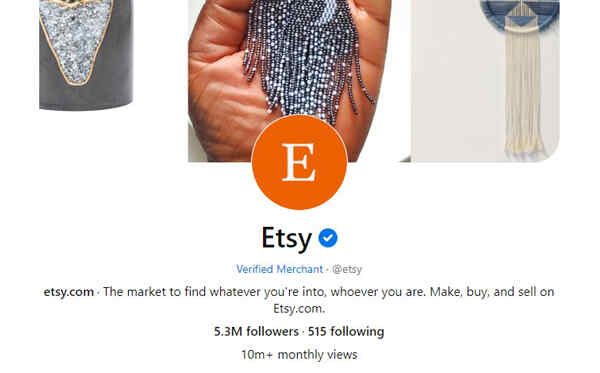
It also helps your Pinterest SEO score if you can include relevant keywords in your display name.
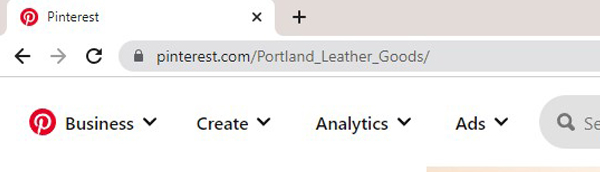
For example, if your business is about leather goods, you can follow this username format by Portland Leather Goods.
Optimize your bio for Pinterest’s search engine
So you might be wondering:
“What is the proper way to create an SEO-friendly Pinterest bio?”
Start by defining exactly what you offer (or provide) to your audience using relevant keywords and key terms.
Your Pinterest bio should tell other Pinterest users what your content can do for them and what they can expect to see/learn/discover on your pins and boards.
You can add up to 500 characters to your Pinterest bio, so make it count. Furthermore, you can also check out other profiles of brands and businesses like yours for more ideas and inspiration.
Upload a professional-looking profile photo
A professional profile photo on your Pinterest account can help your brand identity.
Most businesses use their logo as a profile picture (eg Etsy and Portland Leather Goods), but using a photo of yourself if you are your brand’s or business’s face is also a good idea.
Provide a link to your website, blog, or shop
Adding a link to your website on your Pinterest profile will significantly help drive new traffic from Pinterest to your business which can help improve your domain quality.
Not to mention, new traffic means new potential customers!
3. Claim your business website on Pinterest
Claiming your website on Pinterest is good for your overall SEO and brand identity. Here’s why.
When you claim your website, you will have access to crucial data and see how your pins and contents perform on Pinterest. Moreover, claiming your website tells people where they should go to find more of your content.
And that’s not all!
Below are other benefits of claiming your website on Pinterest.
- Your website link will spread over the Pinterest platform and help you accumulate more organic backlinks.
- Claiming and verifying your website automatically adds your profile photo to your pins with a Follow button and a link to your website.
- Verifying a website with Pinterest boosts your overall SEO efforts.
How to claim your website on Pinterest?
One of the ways you can claim your website on Pinterest is to add an HTML tag to your website.
To do this, you must log in to your Pinterest business account. Click the drop-down menu option at the top right side of your profile. Select Settings.
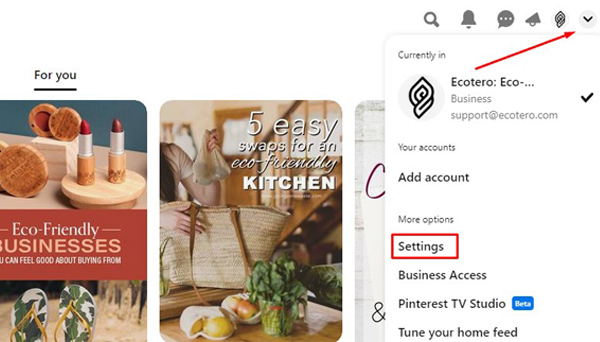
Then, under Settings, click on Claimed accounts > Websites > Claim.
A popup window displays three options for claiming your website, one of which is to Add an HTML Tag. Select that option and click Continue.
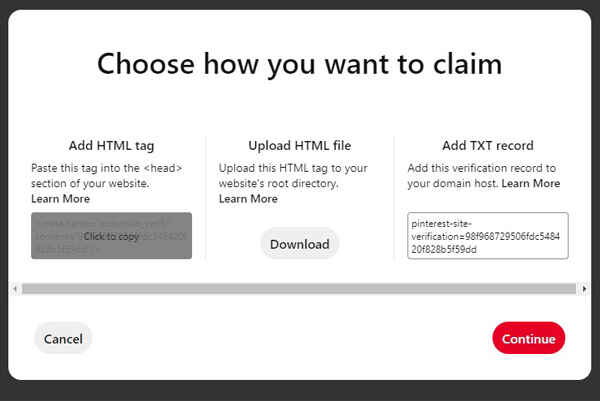
Next, paste the HTML tag you copied into your website’s <head> section.
There are various ways to complete this step based on your current website provider. So to avoid confusion, click here for a complete guide on how to complete this step.
Once you have successfully uploaded the HTML tag to your website, enter your website URL into the pop-up box and then click Verify.
If all the steps are done correctly, you should see a pop-up box with a “Connected” message after you click the Verify button.
This is just one way to claim your website on Pinterest, there are other ways to do so, which you can find here.
Note: You can claim more than one website using the same Pinterest business account.
4. Find popular keywords for your niche
Using the right keywords is the bread and butter of SEO. Hence, it is crucial that you know where and how to find the best Pinterest keywords for your niche.
How to find popular Pinterest keywords
There are four easy ways to find popular keywords on Pinterest: Use Guided Search, Colored Bubbles, Pinterest Trends, and through Pinterest Ads.
Let’s discuss each of them.
Use Pinterest Guided Search
The first way to find keywords for your niche on Pinterest is by means of guided search or autosuggestions.
For example, let’s say you want to promote your printables shop on Pinterest.
If you type “printables” into the Pinterest search bar, Pinterest will start suggesting popular keywords related to this term.
You will even find Pinterest profiles related to printables. (see the image below for reference)
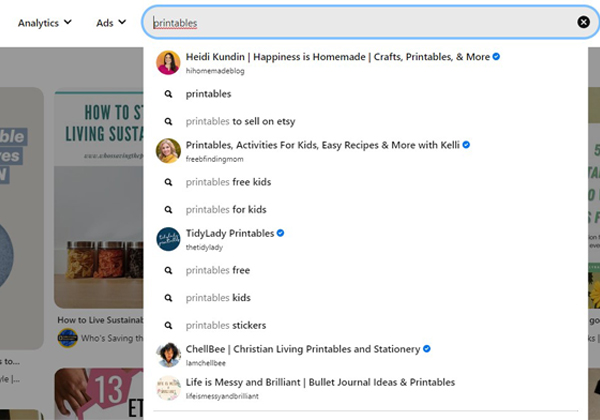
Use this method to quickly build a comprehensive Pinterest keyword list for your pins and boards.
Colored Bubbles
You can also find some of the best keywords from Pinterest through colored bubbles or colored boxes.
This time, let’s say your business is all about leather goods.
If you type in “leather goods” in the search bar and hit Enter, you will get these colored bubbles that contain popular terms and keywords related to your original query.
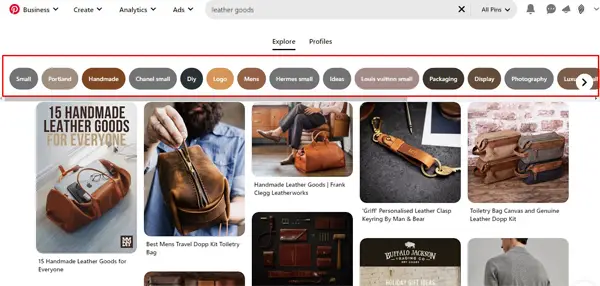
Each of these colored bubbles contains keywords that people are searching for on Pinterest and are highly related to your original query.
Pinterest Trends
Another great way to find highly relevant keywords for your niche on Pinterest is through Trends.
Pinterest Trends is an excellent Pinterest SEO tool that will give you precise insights into what pinners are interested in. This feature displays a historical view of the top search terms by Pinterest users across different regions and countries.
Familiarizing how Pinterest Trends works will give you the power to optimize your content with proper keywords and improve your relevance to your target audience.
So how can you find keywords with Pinterest Trends?
First, navigate to the Analytics tab on your Pinterest profile, click the drop-down button, and select Trends.
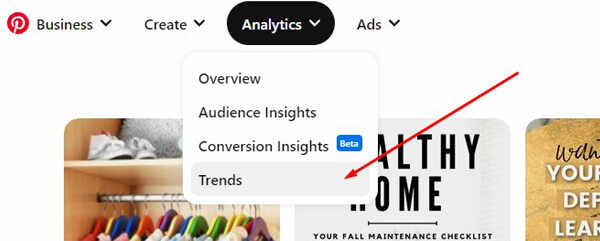
Select the region you want to view on the upper right of Pinterest Trends. By doing so, Pinterest will display the top trends in your selected region.
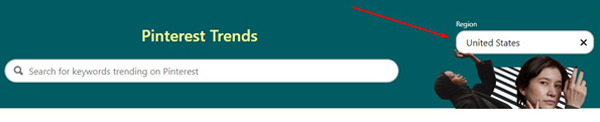
You can filter the results for top monthly trends, top yearly trends, growing trends, and seasonal trends.
You can also filter the results by Interests, Keywords, Age, and Gender.
Pinterest Ads
Okay, we know what you are thinking, but don’t worry. You will not be creating a paid Ad and will not be paying money for this Pinterest SEO research.
We will just use Pinterest Ads to find keywords for your niche. Here’s how.
First, go to Ads and select Create campaign.
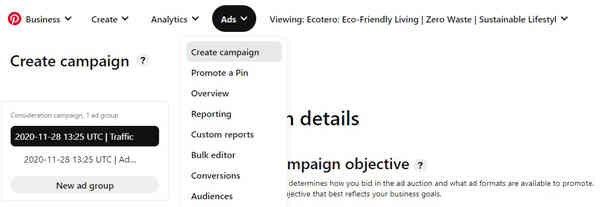
Under Campaign Creation, select Manual Campaign and click Get started.
Next, you will land on a page with Campaign Details. Choose any of the campaign objectives> Drive consideration > Consideration > Continue.
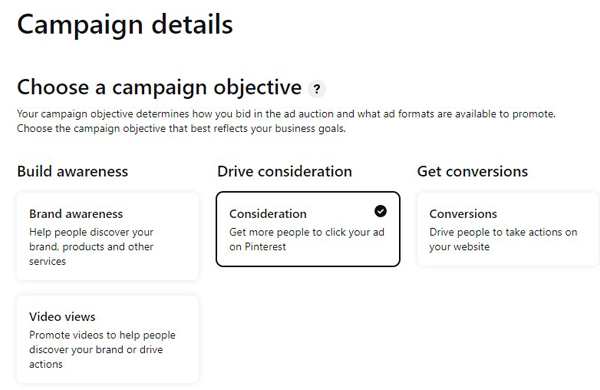
Scroll down to Targeting details, select Choose Your Own, and scroll down and click Interests and Keywords.
Click Add keywords to toggle the search function. Under Extend your reach, type in a keyword related to your content. This can be anything that relates to your audience.
For example, if you want to promote your printable Etsy store on Pinterest, you can find related keywords by typing in the term “printables,” and voila!
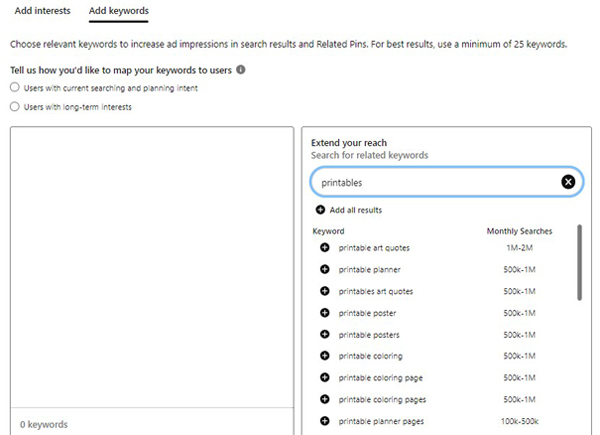
The tool will then display related keywords and the number of monthly searches for your query.
Take note of the keywords and pick the ones that are relevant to you.
5. Create keyword-rich pin titles and descriptions
Now that you know where to find popular keywords for your niche, it’s time to put them to use.
Optimize your pin titles and descriptions using relevant keywords to help them rank higher on search results.
However, be careful not to overdo it. Adding too many keywords to your copy can make your content look spammy.
Furthermore, Pinterest frowns upon keyword stuffing or the practice of adding as many keywords on pin titles and descriptions without context.
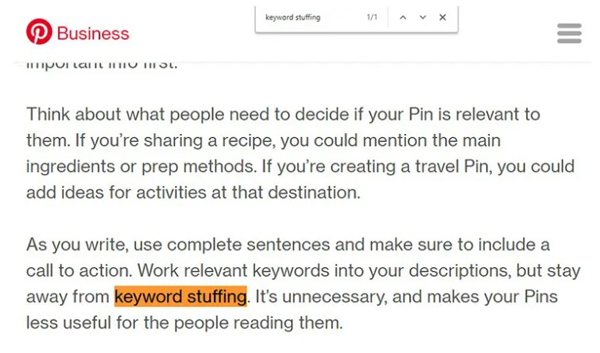
So, what do compelling pin titles and descriptions look like? Below are the title and description guidelines from Pinterest.
Pin Titles
- Prioritize using the exact keywords you are using in your linked content.
- Use grammatically correct and professional language.
- You can use up to 100 characters for your pin title.
- In general, only the first 40 characters will appear in Pinterest feeds. Hence, use the first 40 characters to give as much context to your pin as possible.
- Use title case rather than sentence case in your pin titles to make them look official (and more like a headline).
- Avoid using all caps, HTML tags, and promotional text, as it may appear untrustworthy to users.
- Your pin title should be short and tells your audience exactly what they can expect to learn from your content.
Pin Descriptions
- You can use up to 500 characters for your pin description.
- In most cases, your description’s first 30-60 characters are most likely to appear in the feed. Hence, it is good for your SEO score to include highly relevant keywords near or at the beginning of your pin descriptions.
- Mention your brand name in the first line of your description.
- Write your Pinterest description using a natural sentence structure and avoid keyword stuffing.
- Pinterest encourages adding hashtags in your pin descriptions to help pinners find the most relevant and fresh pins on their feed. About 4-5 hashtags should be acceptable, more will make your pin description ugly and disorganized.
- Include a call to action in your pin descriptions, telling your audience what you want them to do when they see your content.
6. Create highly clickable pins

Here’s the hard truth: No matter how keyword-optimized your pins are, some people might not click on them regardless if they rank high on search results.
According to Pinterest, the best pins are visually compelling, tell a good story, and make people want to learn more.
Below are the best practices when creating pins that go viral on Pinterest.
Standard Pins
- Use eye-catching and high-quality vertical images highlighting your products, recipes, photos, and more.
- Pinterest recommends using a 2:3 aspect ratio for images (ex: 1000 x 1500 pixels).
- Avoid using abstract images or lifestyle imagery that doesn’t showcase your brand.
- Put a logo on every pin you make but avoid the lower-right corner since that spot gets covered up by product icons.
- Add a text overlay on your pin image to give it more context and help it stand out.
Video Pins
- Use a video clip with a clear hook within the first few seconds to capture people’s attention.
- Use videos between 15 seconds and 1 minute long. For video ads, 6-15 seconds works best.
- Like standard pins, add text overlay or captions on your video pins to help tell your story. Some people watch videos with no sound, so it’s best not to rely on audio or dialogue.
- Select a captivating cover image when you upload your video pin.
Besides the best practices for creating the perfect pins above, here are some notable characteristics of highly-clickable pins shared by the visual analytics and marketing platform Curalate.
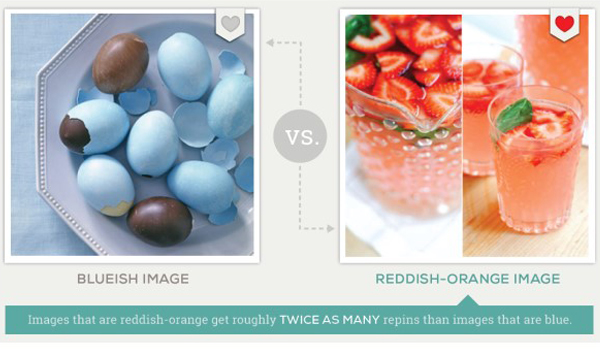
- Pins with images that contain reddish colors perform better on Pinterest.
- Images with multiple dominant colors have 3.25 times more repins per image than single-color images.
- Pins without faces receive 23% more repins than pins with faces.
- Pins that contain images of medium lightness are repinned 20x higher than very dark images.
- Pins that contain less than 10% background (e.g. whitespace) are repinned 2 to 4 times more than images with more than 40% background.
- Images with smooth textures are repinned up to 17 times more than images with rough textures.
Pinterest is a visual search engine, so one of the best ways to make your content SEO-friendly is to create pins that users want to look at, save, and interact with.
7. Utilize different kinds of pins
There are different kinds of pins; for every search query, Pinterest will show different pins in the search result.
So to maximize the exposure and visibility of your brand, create different kinds of pins for each of your content.
During the publication of this Pinterest SEO guide, you can create 6 different types of pins on Pinterest.
| Standard Pins | Standard Pins (also known as Static Pins) are the most shared pins on Pinterest. These vertical pins only feature a single image. |
| Video Pins | Video Pins are content on Pinterest featuring a single video that automatically plays when they appear in the home feed. |
| Idea Pins | Idea Pins can include up to 20 pages of images, video clips, or a combination of the two. |
| Rich Pins | Rich Pins are pins that automatically sync information from your website to your Pins. This includes the most up-to-date pricing of your product, availability, and product information. |
| Product Pins | These pins feature products shoppers can readily buy from the merchants and sellers listed in the Pin. |
| Collections Pins | Collections Pins are product pins that have been grouped in a collection and have two components – a large primary image (hero image) and three supporting images called secondary images. The collections pin only appears on mobile devices (Most Pinterest users are on mobile). |
By creating multiple kinds of pins, you’re making sure you’re not missing any opportunities to reach your audience and potential customers.
8. Pin regularly and often
Pinterest loves pinners that are consistently putting out new content on the platform.
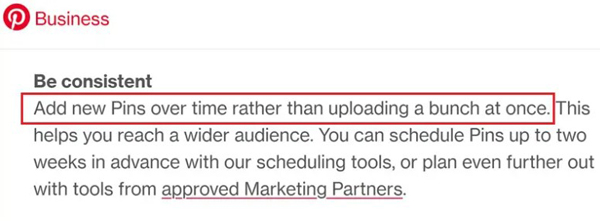
If you’re regularly pinning new images, it is highly likely that Pinterest will rank your content higher over your inactive competitors.
Moreover, pinning in regular intervals (rather than all at one go) will help you reach more audiences.
9. Create multiple (and highly searchable) boards
Did you know that even the most influential and veteran personalities on Pinterest don’t always get most of their pins to go viral in one try?
However, they still consistently manage to get traffic to their site from Pinterest. Their secret?
They make multiple boards for a specific topic, and they save the same pin under different boards.
By having multiple boards, you will help your pin get exposed to your target audience repeatedly. Under the right condition and SEO optimization, one pin can gain traction and become viral.
But creating multiple boards isn’t enough. You also have to make sure that your boards are SEO optimized.
How to optimize your Pinterest Boards for SEO
Start by naming your board titles using keywords relevant to your niche.
Also, use relevant keywords on your board descriptions. Similar to pin descriptions, you can use up to 500 characters for your board descriptions.
10. Ensure your links are live and accurate
Don’t you hate it when you click on a link that turns out to be broken or takes you to unrelated information? The same is true for other people.
So before you publish your pins, always check, double-check, and triple-check if your link works.
This way, you ensure that your pins bring traffic to your site.
Moreover, ensuring that your link takes your audience to the right content builds trust and confidence among your followers.
The next time they find your pin interesting, they wouldn’t hesitate to click it because they know they will find a piece of valuable information in return.
This will increase your pin engagement rate and improve your Pinterest SEO score.
11. Join group boards
Pinterest Group Boards are collaborative boards where content creators can share their pins.
The general idea behind group boards is that creators can broaden everyone’s reach within a particular niche and share audiences for their relevant content.
Hence, joining a group board is an excellent way to get more eyeballs on your pins and traffic to your site.
How to find group boards?
Below are the 3 simple ways to find and join group boards on Pinterest.
Use the Pinterest Search Bar
Like finding keywords, you can also use the Pinterest search bar to find group boards for your niche.
First, you type in your niche + group boards, e.g., printables group boards. Then, you need to change the filter at the right side of the search bar from All Pins into Boards, and you’ll find the top-ranking group boards in the home decor niche.
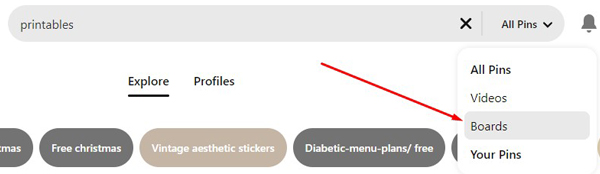
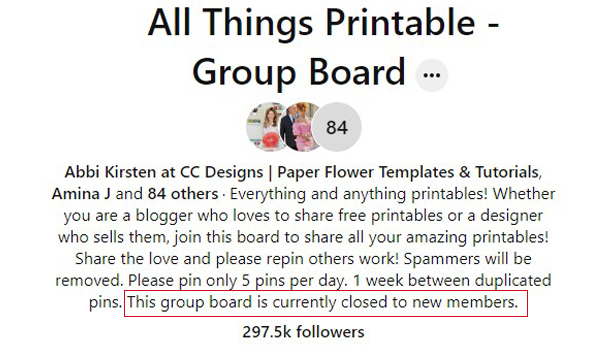
Pick one of the group boards on the search result, click on it, and you’ll see a page that shows you information about the group board, like the owner, how many contributors it has, followers, and, more importantly, instructions on how you can join.
Some group boards already have plenty of members and are currently closed to new member applications like the one in the image below.
But don’t fret. There are plenty of other group boards looking for active members.
Just take your time looking for them; before you know it, you’re already a member of multiple group boards in your niche.
Join Group Boards of Your Competitors
Another way to find a group board you can join is to visit the user profile of top-ranking pinners on your niche and see which group boards they’re pinning to.
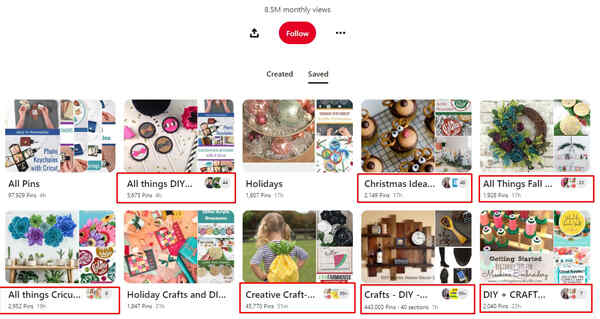
Once you are on their Pinterest profile, go to the Saved section, and from there, you will find the group boards they are a member of.
In case you don’t know how to tell a group board from a regular one, multiple profile pictures are shown on group boards. See the image below for reference.
Visit each group board you can find on their profile and find out the requirements for joining.
PinGroupie
The final way to find Pinterest group boards is via PINGROUPIE.
PINGROUPIE is a third-party website where you can view different group boards for different niches on Pinterest.
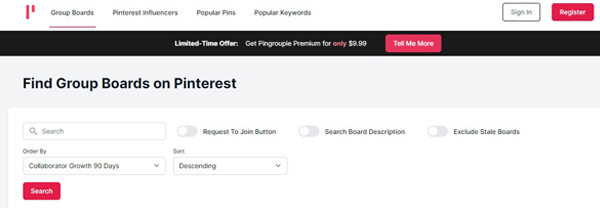
Simply type a keyword on the search bar, and PINGROUPIE will show you the group boards related to your query.
Which group boards should you join?
Now, we want to be clear. While joining group boards can provide you with some benefits, there are some guidelines you must follow for this particular Pinterest SEO tip.
First of all, only join group boards that are relevant to your niche. It might be tempting to join as many group boards as possible to maximize your content’s exposure.
However, remember that you have a target audience; your pins will only make sense for people in your niche.
Second, join group boards that are keyword-optimized. You already know how optimizing your boards for SEO can increase your chance of making them the top results for queries. The same thing can be said for group boards.
And finally, join group boards with no language barrier. Even if the group board is related to your niche, but you and the members don’t speak the same language, your content might not appeal to their audience.
12. Check your Pinterest analytics regularly
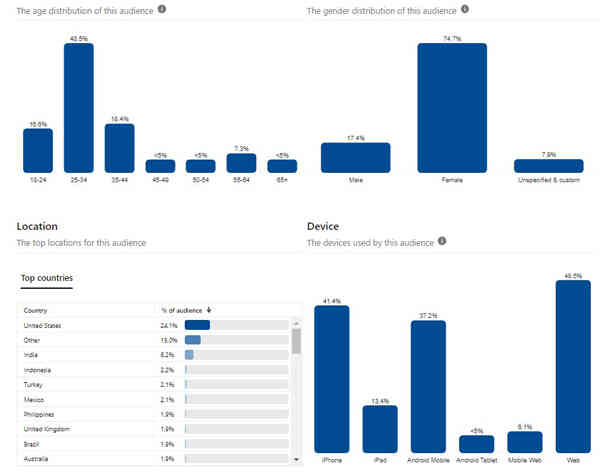
Use Pinterest Analytics and dedicate some of your time to identifying which of your pins are doing well and resonate with your target audience.
Then, optimize your next pins based on these high-performing pins and stay away from the ones that are not performing well.
After all, creating pins and optimizing your content takes a lot of time. Don’t let your Pinterest SEO efforts go to waste.
13. Give Pinterest Ads a Shot
While this SEO tip will require you to spend money, Pinterest Ads can benefit new and starting businesses.
For starters, most Pinterest users or Pinners are looking to shop.
Therefore, running a paid advertisement on Pinterest has a 2x higher return with a 2.3x cheaper cost per conversion than other social media platforms.
Meaning you get your money’s worth.
Moreover, Pinterest Ads will also show the content you promote (Promoted Pins) to users who are most likely to be interested and buy your products.
And even if users don’t buy products, the extra exposure your content gets from Pinterest Ads will lead users to remember and recognize your brand the next time they see your other pins.
14. Share other people’s pins
While it may seem counterintuitive, sharing other people’s pins can help your brand’s visibility and integrity.
Why? Because pinning relevant and inspiring pins from other creators can be helpful for your audience.
When other people see that your content can provide value to them, it is highly likely that they will follow your Pinterest profile and save or reshare your pins themselves.
Moreover, when you share pins from other creators, it is most likely that they will also return the favor.
However, there are things to remember if you want to repin or share other people’s content.
First, ensure that the pin you share is related to your niche.
You wouldn’t want to share pins about tattoos when your business is about leather goods, it doesn’t make sense and might confuse your audience and the Pinterest algorithm as to what your brand is all about.
Focus on repinning relevant, valuable, and inspiring content to your target audience.
That being said, creating and publishing your own pins should be your priority, but sharing other people’s pins can also be good for your overall SEO in the long run.
15. Run your Business on WordPress
If you run your business on WordPress, it would be wise to add a WordPress SEO plugin called Rank Math because it provides all the SEO tools you need.
While not Pinterest related, your website can act as a landing page to deliver your visitors to either an affiliate product, lead capture, or selling your own products.
16. Keep at it and be consistent
Consistency on Pinterest, like most things in life, is essential. And the truth is, things will not be easy.
So whatever hurdles you encounter in the future while promoting your business on Pinterest, keep a positive attitude and keep going.
Let the SEO tips and best practices shared in this article guide you to reaching your goals and objectives on Pinterest.
The Bottom Line
Pinterest is more than a social media platform for recipes, DIY, wedding decor, and other interests.
With the right SEO strategy, Pinterest can help business owners build their brands, improve online visibility, generate organic traffic, and boost sales.
Follow the simple yet highly effective Pinterest SEO tips this article shares and take your business to the next level in 2023 and beyond!
FAQ
Is Pinterest good for SEO?
Pinterest is more than just a social media platform. It can be a great source of quality traffic to your site.
And guess what? Direct website traffic is still one of the most influential SEO ranking factors to date.
When many users go to a website directly, it signals to Google (and other search engines) that the domain has high authority and valuable content, improving your site’s overall SEO score.
How do I optimize SEO on Pinterest?
Some of the essential SEO tips that highly impact the performance of your pins within the platform include keyword optimization, using the right pin image, and creating clickable pins. Read on to learn more proven and tested Pinterest SEO tips for 2023 and beyond.
How do I find SEO keywords for Pinterest?
There are four ways to find popular Pinterest keywords you can use for your pins and boards. First, you can use the Pinterest search bar to get relevant keywords for your niche. You can also use colored bubbles, Pinterest Trends, and Pinterest Ads to discover keywords on Pinterest.